Setting up Khaleeji COD for Saudi Arabia
In Saudi Arabia, limit Cash on Delivery by place with the city rule. Tick Hide COD in these
cities and list each city in English and in Arabic, with SA: in front, for example
SA:Riyadh, SA:الرياض. The region rule can't help here, because Shopify's Saudi checkout doesn't
ask for a region. The other rules (tagged customers, cart total, first order and no-cod
products) work the same as anywhere else. Just check that the amounts suit your currency.
Why doesn't the region rule work for Saudi Arabia?
Shopify's address data for Saudi Arabia has no list of regions, so the checkout form has no region field. The shopper types a city, and the five-digit postal code is optional. With no region on the address, there's no code for Khaleeji COD to compare, so anything you type in Hide COD in these emirates or regions never matches a Saudi order.
In the GCC, only the UAE and Kuwait have a region field at checkout. For Saudi Arabia, Qatar, Bahrain and Oman, the city is the only part of the address the app can use.
How do you write Saudi city rules?
- Open Khaleeji COD and go to Checkout rules.
- Tick Hide COD in these cities. In the Arabic admin it reads «إخفاء الدفع عند الاستلام في هذه المدن».
- Type the cities, separated by commas. An English comma or an Arabic comma «،» both work.
- Click Save rules.
Expect Arabic. Shopify's own example Saudi address writes the city as «الرياض», and the city field is typed by the shopper. Before you build your list, export your Saudi orders and read the shipping city column to see the spellings your shoppers really use.
Why put SA: in front?
A city name on its own matches in every country you ship to. Some names exist in more than one GCC
country: Salwa, for example, is a town in Saudi Arabia and an area in Kuwait. SA:Salwa hides COD
only when the shipping address is in Saudi Arabia.
The code must be the two-letter country code, SA, followed by a colon. KSA:Riyadh doesn't work:
the app reads the whole thing as a city name, and no shopper's city is "KSA:Riyadh". The full rules
for this format are in city rules for one country only.
What does spelling folding cover?
Since version khaleeji-cod-4 (26 October 2026), the app folds common spelling differences before it compares a city. One entry covers these variants:
| You type | Also matches | Why |
|---|---|---|
SA:جدة | «جده» | «ة» reads as «ه» |
SA:الأحساء | «الاحساء» | «أ إ آ» read as «ا» |
SA:أبها | «ابها» | «أ» reads as «ا» |
SA:مكة المكرمة | «مكه المكرمه» | «ة» reads as «ه» |
SA:Al-Khobar | "al khobar", "AL KHOBAR" | hyphens read as spaces, capitals ignored |
Arabic vowel marks and tatweel (the stretching line, «ـ») are ignored too.
Folding doesn't translate and doesn't guess, so add separate entries for these:
- English and Arabic. "Riyadh" doesn't match «الرياض».
- Different English spellings. "Jeddah", "Jedda" and "Jiddah" are three entries. So are "Makkah" and "Mecca".
- Missing or extra words. "Riyadh" doesn't match "Riyadh City" or "Ar Riyadh", and "Al Khobar" doesn't match "Khobar".
- The letter «ئ». It isn't folded, so «الطائف» and «الطايف» are two entries, and so are «حائل» and «حايل».
Which amounts make sense in SAR?
Every amount in Khaleeji COD is in your shop's currency. The GCC preset fills in 1,500 for the cart and 500 for a first order as plain numbers. It doesn't convert them:
- In a store that runs in SAR, the preset means SAR 1,500 and SAR 500.
- In a store that runs in AED and sells to Saudi Arabia, it means AED 1,500 and AED 500. When a Saudi shopper pays in SAR, the app converts the checkout total to AED with the rate Shopify gives it for that checkout, then compares.
The amount compared is the checkout total, the amount the shopper pays, so shipping and VAT count once they're added. "Above" means more than: with 1500, a total of exactly 1,500.00 keeps COD.
The GCC preset, rule by rule explains each amount and how to change it.
On the Free plan, the preset switches on only the cart rule, because Free allows one rule. If a city list matters more to you than a cart limit, switch the cart rule off and the city rule on. Pro ($7.99/month after a 14-day free trial) lets you use both. See Free or Pro.
What do Arabic shoppers see?
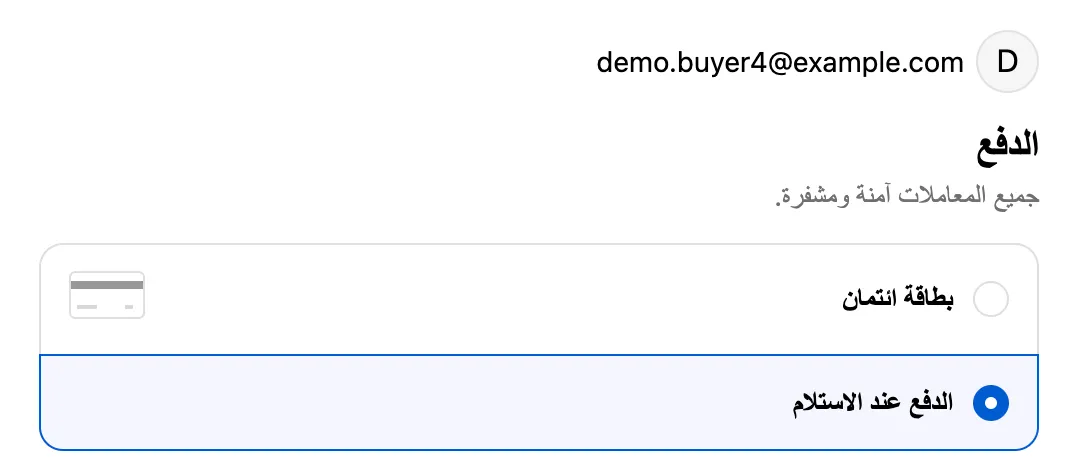
With Show a clear name at checkout ticked, shoppers whose checkout is in Arabic see COD as «الدفع عند الاستلام». Everyone else sees "Cash on Delivery". You can change both names, and the rename doesn't count toward the Free plan's one-rule limit.
How do you test a Saudi address?
- Create a draft order with a Saudi shipping address. Type a city that one of your entries
covers, for example «جده» if your list has
SA:جدة. - Keep the cart below your first-order amount, so no other rule hides COD.
- Open the draft order's checkout link in a private window and go to the payment step. COD should be gone, with cards and other methods still there.
- Change the city to a spelling that isn't on your list. COD should come back. Trying a few spellings this way shows you which ones your list covers.
Payment rules don't run when you collect payment inside the Shopify admin, so always test through the checkout link or your storefront. The full steps are in how to test checkout payment rules with draft orders.
Where can you read more?
- Cash on delivery in Saudi Arabia: mada, the Saudi address form and Arabic checkout.
- Saudi National Address and fewer failed deliveries.
- Different COD rules per GCC market, if you sell to several Gulf countries from one store.
Sources
- Shopify worldwide: Saudi Arabia address data (SA.yml)
- Shopify.dev: Payment customization Function API
Checked on the date above. Shopify and courier settings change, so check the source if something looks different.