
The GCC preset, rule by rule
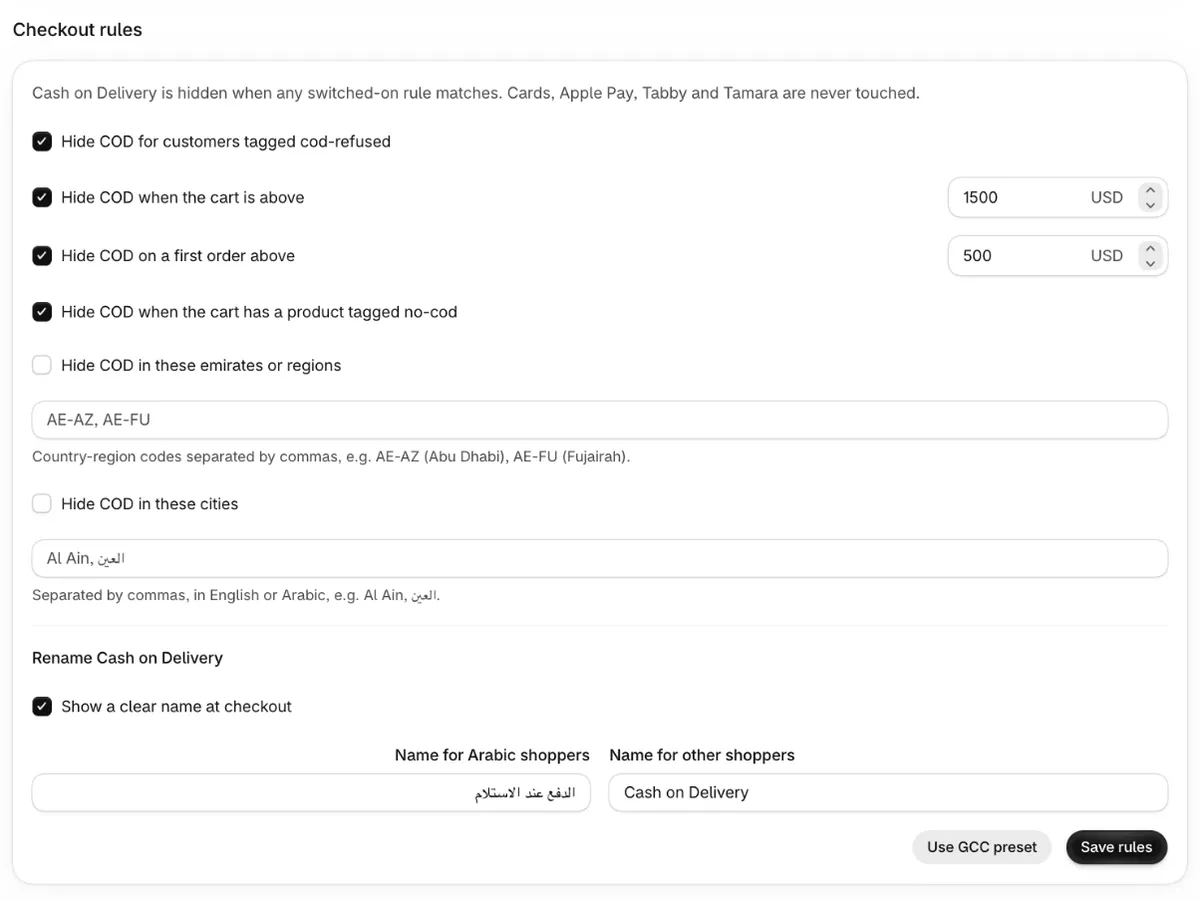
The Use GCC preset button fills the Checkout rules form with a starting setup for GCC stores: four rules on, two rules off, and the Arabic and English name for COD switched on. Nothing changes at checkout until you click Save rules. After that, COD is hidden whenever any switched-on rule matches.
What does the preset switch on?
| Setting in the app | Preset value |
|---|---|
| Hide COD for customers tagged cod-refused | On |
| Hide COD when the cart is above | On, 1500 |
| Hide COD on a first order above | On, 500 |
| Hide COD when the cart has a product tagged no-cod | On |
| Hide COD in these emirates or regions | Off, empty list |
| Hide COD in these cities | Off, empty list |
| Show a clear name at checkout | On: «الدفع عند الاستلام» for Arabic shoppers, "Cash on Delivery" for others |
Rule 1: customers tagged cod-refused
COD is hidden for any customer with the tag cod-refused or cod-blocked. The preset switches it
on because it changes nothing until you tag someone, and after that it stops that customer choosing
COD again.
The rule can only see customers that Shopify has identified at checkout, for example a shopper logged in to their account, or a draft order assigned to a customer. A guest checkout has no customer record, so a tag can't match it. You can tag customers by hand in Shopify, or use the refuser scan on the Pro plan.
Rule 2: cart above 1,500
COD is hidden when the checkout total is more than 1,500 in your shop's currency. A total of exactly 1,500 still shows COD.
When a big COD order is refused, more of your stock has been out on the road and more cash was due on delivery. Hiding COD above a limit keeps that risk for smaller orders only. Shoppers with a big cart still see your card and other online payment methods.
The checkout total is the amount the shopper is about to pay, so shipping and tax count once they're added. If the shopper is paying in another currency, the app converts their total to your shop's currency before comparing. How to hide COD above a cart total explains how to choose a limit from your own orders.
Rule 3: first order above 500
COD is hidden on a first order when the total is above 500. A first order means a guest checkout, or a customer whose order count in Shopify is 0.
This amount is lower than the cart limit on purpose. A new shopper has no history with you, so they get a smaller COD limit, and small first orders under 500 still get COD. Customers who have ordered before are only checked against the 1,500 cart limit.
Guests always count as first orders, even if the same person has bought from you before as a guest. The app only sees a shopper's order count when Shopify has identified them at checkout, for example when they're logged in. For more on this rule, see how to hide COD on large first orders.
Rule 4: products tagged no-cod
COD is hidden when any product in the cart has the product tag no-cod. One tagged product is
enough. Like the refuser rule, it changes nothing until you tag a product, which is why the preset
switches it on. Use it for items you don't want to send out unpaid, such as made-to-order or
high-value products.
Why are the region and city rules off?
They need your own list. No single list of emirates, regions or cities fits every store, so the
preset leaves both rules off and empty. When you know where your refusals come from, fill in UAE
region codes (such as AE-AZ for Abu Dhabi) or city names (such as Al Ain, العين), tick the rule
and save. Outside the UAE, use city names. See how to limit COD by emirate, region or city.
Why 1,500 and 500?
They're round starting numbers, and nobody worked them out from your store's orders. The app uses the same two numbers whatever your shop's currency, and the same number means very different money in dirhams, riyals, dinars or US dollars. Check them against your own prices before you save.
To choose your own, look at your usual order value and at the totals of your cancelled COD orders. Pick a cart limit that keeps COD for everyday orders, and a first-order limit that keeps it for a new shopper's small trial order.
How do you change the preset?
- Change an amount, untick a rule, or fill in regions and cities.
- Edit the Arabic or English COD name if you want different wording.
- Click Save rules.
Your saved settings replace the preset. You don't need to click Use GCC preset again.
Can you use the preset on the Free plan?
The Free plan includes one checkout rule plus the Arabic and English COD name. The preset switches on four rules, so saving it on Free shows: "The free plan includes 1 rule plus the Arabic name. Switch off the extra rules or upgrade to Pro." Keep the rule that matters most to you and untick the rest, or move to Pro ($7.99/month after a 14-day free trial) to keep all four. Every rule is described in the checkout rules reference.
Sources
Checked on the date above. Shopify and courier settings change, so check the source if something looks different.
