Free or Pro: which Khaleeji COD plan you need
Khaleeji COD has two plans. Free gives you a clear Cash on Delivery name at checkout, in Arabic and English, plus one checkout rule. Pro costs $7.99/month after a 14-day free trial and adds every checkout rule, the refuser scan and the money-lost report. You approve and pay for Pro through Shopify, so there's no separate account or card to set up with Khaleeji COD.
What's in each plan?
| Free | Pro | |
|---|---|---|
| Price | $0 | $7.99/month |
| Free trial | 14 days | |
| COD name in Arabic and English | Yes | Yes |
| Checkout rules switched on at once | 1 | All 6 |
| What the GCC preset turns on | The cart rule and the COD name | 4 rules and the COD name |
| Refuser scan | No | Yes |
| Money-lost report | No | Yes |
The Plans section at the bottom of the app lists the same things. Free shows "Arabic name for COD at checkout" and "1 checkout rule". Pro shows "Every checkout rule", "Find customers who refused COD", "Money-lost report" and "14-day free trial". The badge next to the Status badge at the top tells you which plan you're on.
What counts as a rule on Free?
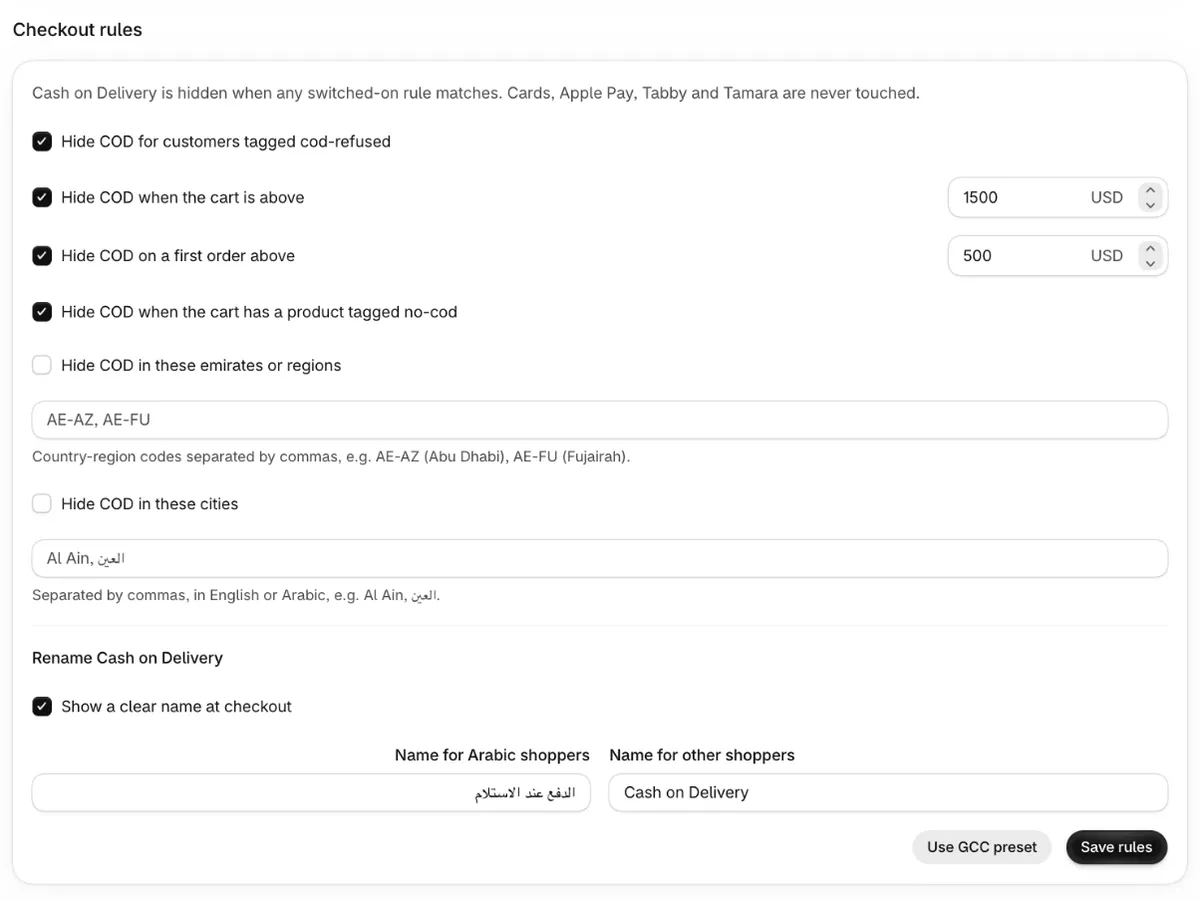
There are six checkout rules: tagged customers, cart above an amount, first order above an amount,
products tagged no-cod, emirates or regions, and cities. Every ticked rule counts toward the
limit, even one with an empty amount or an empty list.
The rename (Show a clear name at checkout) isn't a rule, so it never counts. On Free you can show «الدفع عند الاستلام» to Arabic shoppers and "Cash on Delivery" to everyone else, and still have your one rule.
Your one rule can be any of the six. A store with most of its refusals in a few Saudi cities might choose the city rule. A store that worries about big carts might keep the cart rule.
If you tick more than one rule on Free and click Save rules, nothing is saved and you see: "The free plan includes 1 rule plus the Arabic name. Switch off the extra rules or upgrade to Pro."
What does the GCC preset do on Free?
On Free, Use GCC preset turns on only Hide COD when the cart is above, with 1,500 in your shop's currency, plus the Arabic and English COD name. The app picks the cart rule because it works straight away, without tagging any customers or products. You then see: "Free plan: the preset switched on 1 rule (hide COD when the cart is above your limit) plus the clear COD name. Upgrade to Pro to use every rule."
A new store on Free that hasn't saved any rules yet sees the form filled the same way, so the first Save rules works.
On Pro, the preset turns on four rules: tagged customers, cart above 1,500, first order above 500,
and products tagged no-cod. On both plans the region and city rules stay off until you switch
them on and fill them in, and nothing changes at checkout until you click Save rules.
The GCC preset, rule by rule explains each one.
What else does Pro add?
- The refuser scan looks at orders placed in the last 60 days that are now cancelled, keeps the
ones paid by COD, and lists the customers to tag
cod-refused. Nothing is tagged until you click the tag button. See how the refuser scan works. - The money-lost report multiplies the number of cancelled COD orders that had shipped by your shipping cost out and back. It's an estimate that leaves out packaging, fees and ad spend. See how the money-lost report is calculated.
On Free, both sections show a "Pro feature" badge. The Scan orders button and the shipping cost fields are switched off.
Which plan fits your store?
Free is enough if you mainly want a clear Arabic name for COD and one simple limit, such as no COD on carts above an amount you choose.
Pro fits better if you want several rules working together. Common reasons are customers who have refused COD before, large first orders from new shoppers, products you never send cash on delivery, or a mix of emirates and cities. It also fits if you want the app to find past refusers for you instead of tagging them by hand.
If you can't decide, start on Free, look at your cancelled COD orders, and try Pro during the 14-day trial when you need a second rule.
How do you move to Pro?
- In Khaleeji COD, scroll to Plans and click Upgrade to Pro.
- Shopify opens its own plan page for the app. Shopify hosts this page, and the subscription starts when you approve the Pro plan there.
- Back in the app, the plan badge shows Pro.
- Click Use GCC preset if you want the full Pro preset, check the amounts, and click Save rules. Upgrading doesn't change your saved rules by itself.
The first 14 days are free, then Pro costs $7.99/month. On a development store, you can test Pro free.
How do you go back to Free?
While you're on Pro, the app doesn't show the Upgrade to Pro button, so there's no plan link in the app. Email 9090mohammad123@gmail.com for help changing your plan on Shopify's plan page.
On Free, you can save only one rule. The next time you click Save rules, switch off all but one rule first, or you'll see the Free plan message above. The refuser scan and the money-lost report are switched off on Free.
Where can you read more?
- Quick start: set up Khaleeji COD in two minutes.
- Checkout rules reference: every rule, with edge cases.
- What's new: recent changes, including the Free plan preset.
Sources
Checked on the date above. Shopify and courier settings change, so check the source if something looks different.