
Using Khaleeji COD in Arabic
The Khaleeji COD page in your Shopify admin works in Arabic and in English. It picks a language when it opens, you can switch with one button, and in Arabic the whole page runs right to left. The Cash on Delivery name your shoppers see is a separate setting: it follows each shopper's checkout language, not the language of your admin page.
How does the page choose Arabic or English?
Each time the page opens, it checks these in order and uses the first one that applies:
- Your saved choice. If you used the العربية / English button before in this browser, the page opens in that language.
- Your Shopify admin language. If your Shopify account is set to Arabic, the page opens in Arabic. If it's set to English, the page opens in English. Regional versions, such as Arabic for the UAE, count as Arabic.
- English. For any other admin language, such as French or Urdu, the page opens in English.
Your Shopify admin language is a setting on your own account. To change it, Shopify's steps are: from your Shopify admin, click your store name, click your profile, pick a language in the Preferred language section, and click Save. Shopify says this changes only the language you see in the admin. Your online store stays as it is.
How do you switch between Arabic and English?
Use the button at the top of the Khaleeji COD page. It reads «العربية» (Arabic) when the page is in English, and "English" when the page is in Arabic.
One click changes every heading, rule, button and message on the page. Switching doesn't save your rules or change anything at checkout, and anything you've typed but not saved stays in the form. The next time you open the page in the same browser, it opens in the language you picked.
What changes when the page is in Arabic?
The layout runs right to left. Text lines up on the right, each checkbox sits at the right-hand start of its line, and the amount boxes move to the left.
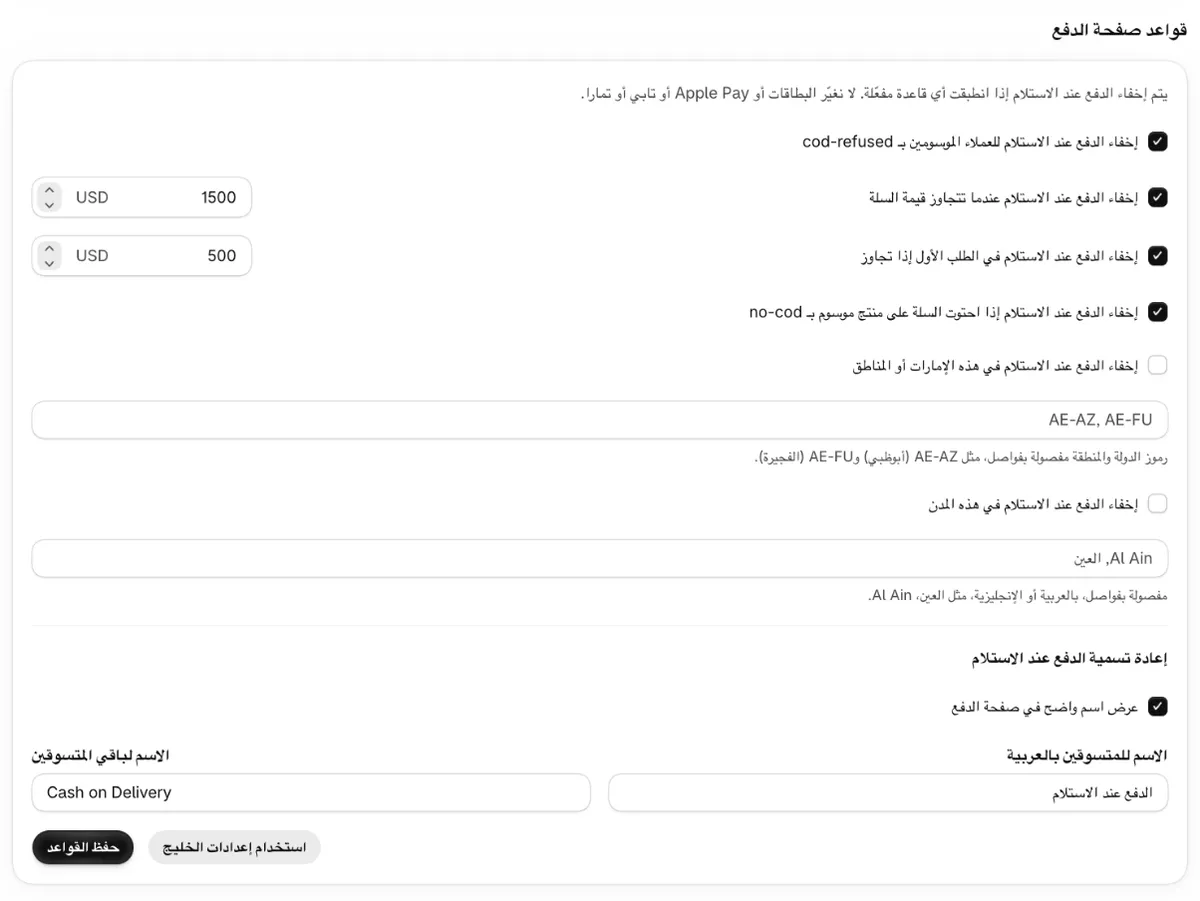
Some things stay in English letters in both languages. Type them exactly as shown:
- Customer and product tags:
cod-refused,cod-blockedandno-cod. - Region codes, such as
AE-AZ(Abu Dhabi) andAE-FU(Fujairah).
The currency code next to each amount box is your shop's currency, in either language.
In the region and city boxes, separate entries with commas. The Arabic comma «،» works too.
City names can be in Arabic or English. The rule compares the whole name, ignoring capital
letters, so add each spelling your shoppers type, for example Al Ain، العين. For more on
spellings, see how to limit COD by emirate, region or city.
If you follow English instructions, such as these help pages, while the page is in Arabic, these are the labels you'll use most:
| English label | Arabic label |
|---|---|
| Use GCC preset | «استخدام إعدادات الخليج» |
| Save rules | «حفظ القواعد» |
| Status: Active, Off, Not set up | «الحالة»: «مُفعّل»، «متوقف»، «غير مُعدّ» |
| Rename Cash on Delivery | «إعادة تسمية الدفع عند الاستلام» |
| Scan orders | «فحص الطلبات» |
| Upgrade to Pro | «الترقية إلى Pro» |
How do Arabic shoppers see Cash on Delivery?
In the Rename Cash on Delivery part of the page, tick Show a clear name at checkout («عرض اسم واضح في صفحة الدفع»). Then:
- Shoppers whose checkout language is Arabic see the name in Name for Arabic shoppers. The default is «الدفع عند الاستلام», which means "payment on receipt".
- Every other shopper sees the name in Name for other shoppers. The default is "Cash on Delivery".
You can edit both names, then press Save rules. The rename is included in the free plan.
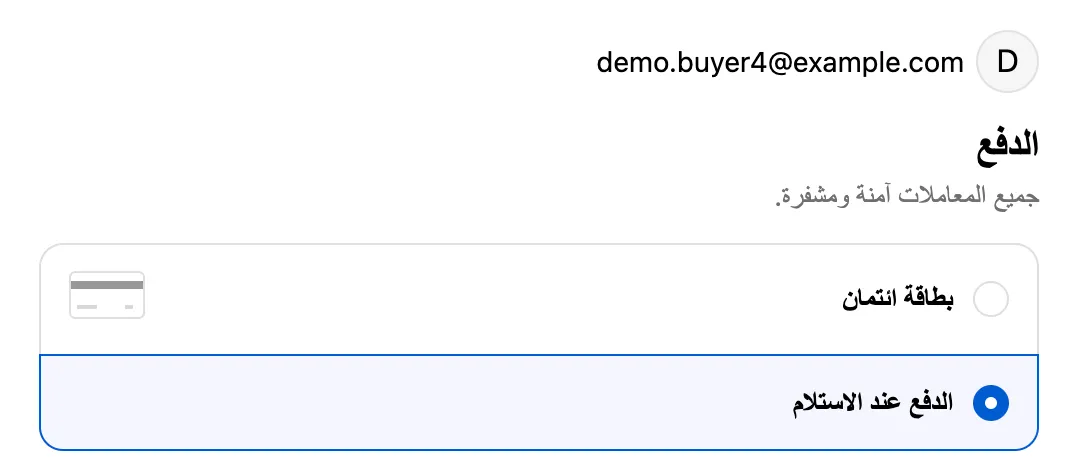
A few details decide which name a shopper sees:
- Only the checkout language counts. A shopper in Riyadh who uses your English checkout sees the English name, and your own admin language makes no difference.
- Your store needs an Arabic checkout. Shoppers get one only after Arabic is added and published in Settings > Languages. Shopify says that after you publish a language, checkout is shown in the customer's language. See how to offer an Arabic checkout on Shopify.
- If you leave a name empty, shoppers in that language see the method's original name, such as Shopify's "Cash on Delivery (COD)".
- When one of your rules hides COD, there is no name to show. The shopper sees only your other payment methods, in either language.
- The app renames only the payment methods it recognises as Cash on Delivery. The list of names is in what Khaleeji COD never changes.
To check both names, open a draft order's checkout link, go to the payment step, then switch the checkout to Arabic and look again. The steps are in how to test checkout payment rules with draft orders. For help choosing the Arabic wording, read what to call Cash on Delivery in Arabic.
Sources
- Shopify Help Center: Choosing your account language and region
- Shopify Help Center: Managing languages
- Shopify Help Center: Localization and translation
Checked on the date above. Shopify and courier settings change, so check the source if something looks different.
