
How to rename Cash on Delivery at Shopify checkout
Shopify's built-in cash on delivery method shows up on an English checkout as "Cash on Delivery (COD)". Shopify's help pages give no way to edit that name, and Shopify reserves it, so you can't create a custom method called "Cash on Delivery (COD)" either. You have two ways to show a clearer name: create a custom manual payment method with your own wording, or rename COD at checkout with a payment customization.
Why rename COD at all?
The default name works, but it isn't ideal for GCC shoppers:
- "(COD)" is jargon. Many shoppers understand "Cash on Delivery" but not the abbreviation.
- It may not read the way you want on an Arabic checkout. Open your checkout in Arabic and check the label. If it isn't the wording you want, you need your own translation or a rename.
- It doesn't say how to pay. If you accept card on delivery as well as cash, the name can say so ("Cash on Delivery: cash or card").
A clear name won't fix refusals on its own, but it removes one small source of doubt at the moment the shopper decides how to pay.
Option 1: Create a custom manual payment method
This is free and takes two minutes. It works when you want one new name for everyone.
- In your Shopify admin, go to Settings > Payments.
- In the Manual payment methods section, select Create custom payment method.
- Enter a name that isn't reserved. "Cash on Delivery" (without "(COD)") or "Pay cash on delivery" both work. Shopify's reserved list includes "Cash on Delivery (COD)", "Cash", "Bank Deposit" and "Money Order".
- In Additional details, add a short line shoppers see next to the method at checkout, for example "Pay the courier in cash when your order arrives."
- In Payment instructions, add what shoppers see on the order confirmation page, for example "Please keep the exact amount ready. Our courier will call before delivery."
- Select Activate.
- Deactivate the old "Cash on Delivery (COD)" method so shoppers don't see two cash options.
The limits of this option:
- One name in the settings. A manual method has a single name field, so its settings can't give Arabic shoppers an Arabic name and everyone else an English one.
- Apps that look for "Cash on Delivery" may not recognise a creative name. If you call it "Doorstep payment", a COD app or courier integration might not treat it as COD. Keep the exact phrase "Cash on Delivery" in the name, or check with the app which names it recognises.
Option 2: Rename COD at checkout with a payment customization
Shopify lets apps change the payment step through payment customization Functions. A Function can rename, reorder or hide payment methods while the shopper is at checkout. It changes what the shopper sees, not your payment settings.
This is the option to use when you want:
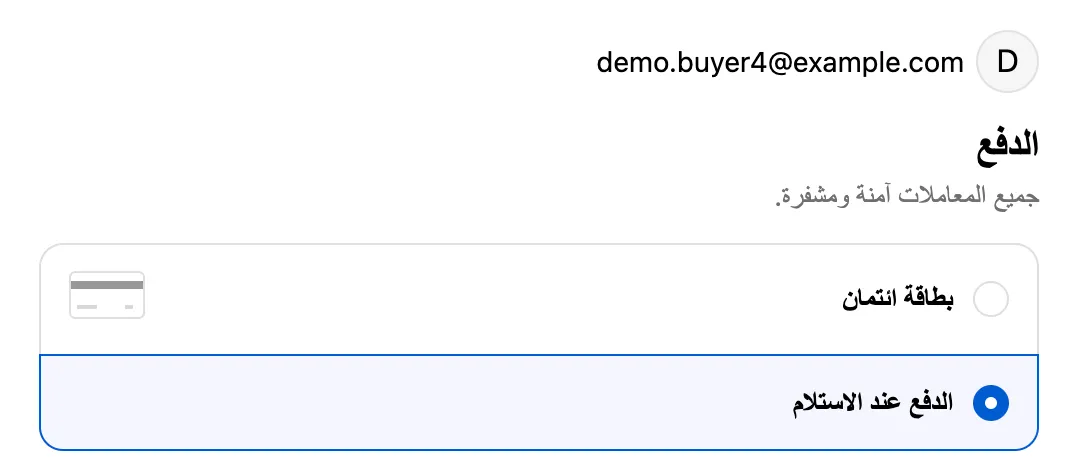
- A different name per language, for example «الدفع عند الاستلام» for shoppers using your Arabic checkout and "Cash on Delivery" for everyone else.
- To keep the built-in method (and any reports or integrations that depend on it) while showing a friendlier name.
- Other COD rules in the same place, such as hiding COD above a cart total.
Two Shopify facts are useful to know before you choose an app:
- Every plan can use it. Shopify says stores on any plan can use public App Store apps that contain Functions. Only custom (private) apps with Functions need Shopify Plus.
- There's a limit of 25 active payment customizations per store. One app normally uses one, so this only matters if you stack many payment apps.
Khaleeji COD works this way: with the rename switched on, shoppers whose checkout language is Arabic see «الدفع عند الاستلام» and everyone else sees "Cash on Delivery". You can edit both names.
What should you call it in Arabic?
«الدفع عند الاستلام» (literally "payment on receipt") is a widely used wording on GCC checkouts. «الدفع عند التسليم» ("payment on delivery") is also understood. Pick one and use it everywhere: product pages, FAQ, order emails and the checkout. For more on the wording, see what to call Cash on Delivery in Arabic.
How do you check that the new name works?
- Create a draft order for a test customer and open its checkout link. See how to test checkout payment rules with draft orders.
- Go to the payment step and check the name.
- If you use different names per language, switch the checkout to Arabic and check again. Shopify's Function sees the checkout language, so the Arabic name only appears on the Arabic checkout.
Which option should you pick?
| You want | Use |
|---|---|
| One clearer English name, nothing else | Option 1: a custom manual method |
| Arabic and English names | Option 2: a payment customization |
| A clearer name plus rules about when COD shows | Option 2 |
If you also want to control when COD appears, read how to hide a payment method on Shopify next.
Sources
- Shopify Help Center: Manual payment methods
- Shopify.dev: Payment customization Function API
- Shopify.dev: About Shopify Functions
Checked on the date above. Shopify and courier settings change, so check the source if something looks different.
